
All SMS messages in your Hatch Campaign sequences must include Sender-Identification
All SMS messages in Hatch Campaigns were updated to include the [[Details Company Name]] snippet on April 10.
Due to TCPA rules, all SMS messages in a Hatch Campaign sequence must include the [[Details Company Name]] snippet as a form of Sender-Identification.
FAQs
Are any other snippets required?
No! The only requirement is that the [[Details Company Name]] snippet (which inserts your company name), is included in the message as a form of sender-identification. Additional snippets like [[User First Name]] (the name on your Hatch Board) or [[Contact First Name]] (the name of the contact you are messaging) are totally optional.
Does this apply to all texts?
No! The requirement only affects SMS messages sent before a contact responds—specifically, your Hatch Campaigns.
Once a contact replies, you are having an ongoing conversation and you’re no longer required to include your company name as a form of Sender Identification.
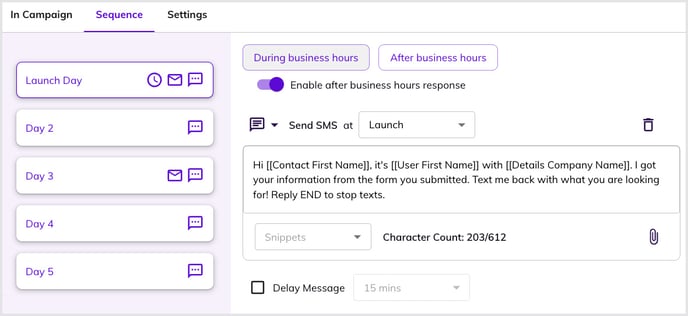
All SMS (text) messages in each step of the sequence for a campaign need the [[Details Company Name]] snippet, see image above.
Do emails and voicemails require Sender-Identification too?
No! This only applies to SMS.
Why is Sender-Identification Required?
Mobile carriers have recently increased enforcement of SMS self-identification rules—meaning all messages must clearly state your company name before a contact responds. Messages that don’t comply will either be blocked or your number could be deactivated.
What if I didn't update my campaigns prior to this change?
Hatch updated all Campaigns that were missing the required snippet on your behalf on April 10th, 2025, to ensure TCPA compliance! These updates were made using AI to incorporate the snippet into your messages in a logical, conversational way.
Now that you're messages were updated to include the snippet, feel free to revisit them and make any changes you see fit.
Any SMS messages that already had the snippet were not re-written.
Who can I reach out to for help?
You can email support@usehatchapp.com or contact your Account Manager here.