As campaigns scale across more contacts, journeys, and use cases, a simple question gets harder to answer:
What actually happened to this contact?
Campaign History gives you that answer — clearly, chronologically, and in one place.
Why we built this
Campaigns don’t break because teams aren’t sending messages.
They break when teams can’t see what happened, when it happened, or why a contact moved the way it did.
Before Campaign History:
- It was difficult to understand why contacts entered or exited campaigns
- Message delivery issues were hard to trace
- Managers lacked a clean audit trail for campaign behavior
As Hatch customers run more automated, multi-step journeys at higher volume, that lack of visibility becomes a real operational risk.
Campaign History closes that gap.
What’s new: Campaign History
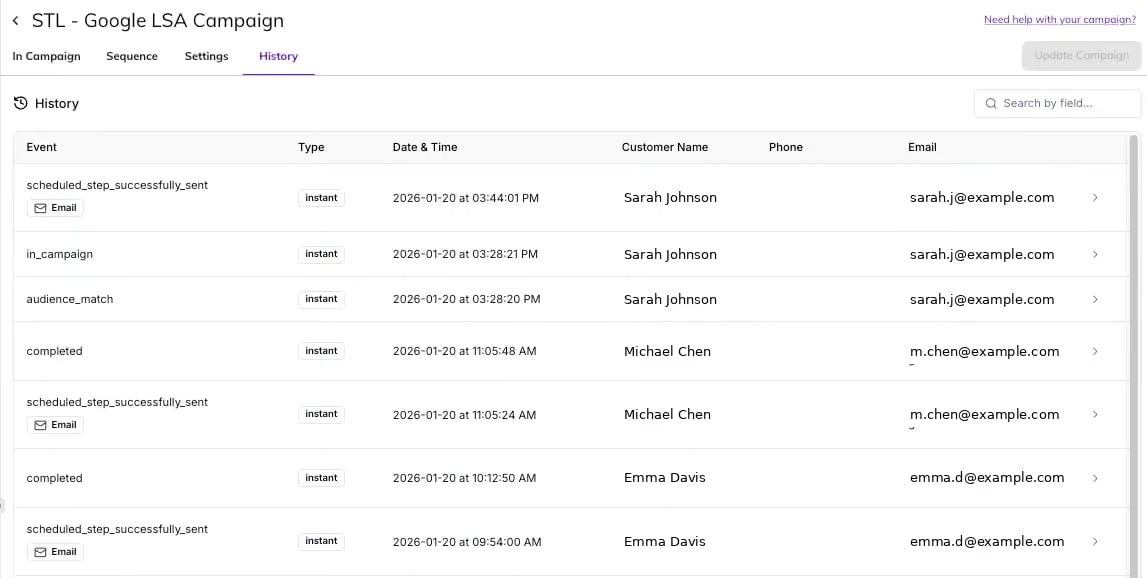
The Campaign History tab shows a complete, chronological view of everything that’s happened to contacts in a campaign.
You can now see:
- When contacts qualified for and entered a campaign
- When messages were sent — and when they weren’t
- When contacts completed a campaign or exited early
- The exact timing of each step, all in one view
No guesswork. No stitching together data across screens.
How it works
Inside any campaign, the History tab provides a detailed activity log at the contact level.
For each interaction, you can view:
- What occurred
- When it occurred (in your board’s timezone)
- Which campaign type was involved
- The contact’s key details
Click into any row to see deeper context, including why the action occurred and the full contact record tied to that moment.
Why this matters
Campaign History turns campaigns from a black box into an inspectable, operational system.
Teams can now:
- Understand who moved through a campaign — and why
- Validate that messages were delivered as intended
- Diagnose issues quickly without guesswork or support tickets
- Confidently scale more complex, multi-step campaigns
For managers, this means stronger accountability.
For leadership, it means confidence that automation is working the way it’s designed to.
Built for scale
Campaign History is designed for high-volume environments, with pagination and controls that make it easy to navigate thousands of events without losing clarity.
This isn’t just reporting — it’s operational transparency for campaigns.
Have questions?
Campaign History is available now inside Hatch.
- Hatch customers, email [email protected], or reach out to your Account Manager here.
- Non-Hatch customers, book a demo here!