We just rolled out a new Hatch AI feature, called alternate after hours responses.
With it, you can customize your bot's responses after hours and on weekends, for improved customer interactions and efficient lead handling. Read on for more details!
How it works
As a refresher, when configuring your bot, you have to tell it how to respond in each of the three outcomes in a conversation:
- Success response: How do you want it to respond when the conversation objective has been achieved?
For example: Recap the conversation, let them know a scheduler will be in touch to confirm the date and time and thank them for their time. - Bailout response: How do you want it to respond if the customer wants to talk to a human rep or asks for a phone call?
For example: Tell the customer someone will reach out shortly. - Discard response: How do you want it to respond if the lead is not qualified or interested?
For example: Tell the customer that if anything changes, don’t hesitate to reach back out.
But in many cases, you may want your bot to respond differently after hours. Which is what this new feature allows.
How to use it
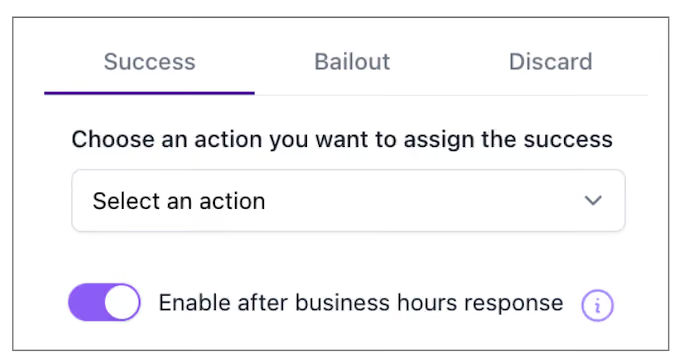
To create an after hours alternate response, head to your bot configuration window, click on the Rules tab, then click on the Success tab.
Click “Enable after business hours response” to toggle it on. You will then see two boxes, one where you can put your during hours response and one for your after hours response.

For bailout and discard responses, the bot will formulate an after hours response based on its instructions for after hours success.
Example
For example, if you’re using a bot to qualify leads and then pass them off to a human for scheduling, here's what your response prompts might look like:
- During hours success response: Give me a moment to check my calendar.
- After hours success response: Let them know we’ll check the schedule as soon as we’re back in the office.
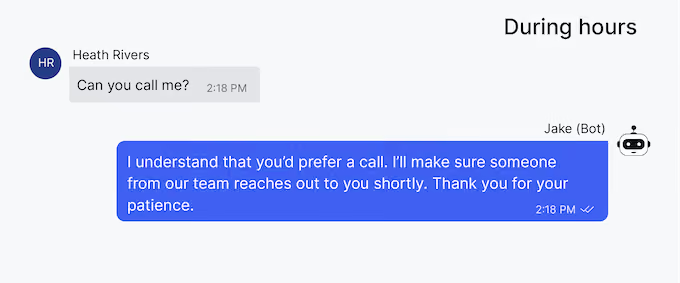
- During hours bailout response: I understand that you’d prefer a call. I’ll make sure someone from our team reaches out to you shortly. Thank you for your patience.
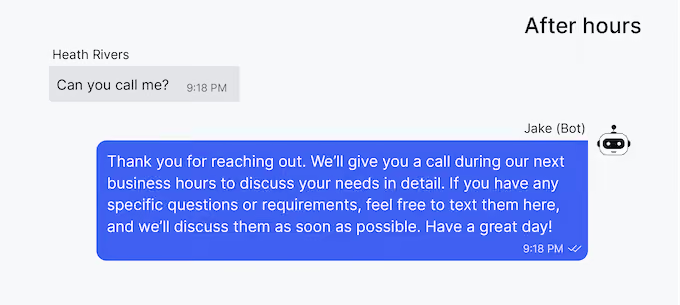
- After hours bailout response: Thank you for reaching out. We’ll give you a call during our next business hours to discuss your needs in detail. If you have any specific questions or requirements, feel free to text them here, and we’ll discuss them as soon as possible. Have a great day!
One thing to keep in mind, if you use a specific script for your success output (For example Say this exactly: "A team member will be reaching out to you in a moment) you’ll want to adjust it to a non-forced script before enabling after hours. Otherwise, the bot may respond with something like "A team member will be reaching out to you in a moment. This message is being sent after hours."
If you have any questions, you can reach out to your Account Manager here.
AI is the future (which is now). Keep building those bots!