Google Local Services Ads has become one of the most important lead sources in home services. These are high-intent homeowners reaching out when they're ready to book, and you only pay when they do.
Now, you can rate your Google LSA leads directly in Hatch so you can improve your lead quality over time without leaving the platform your team already works in. Here's what that means and how it works.
LSA lead rating in Hatch: How we got here
One of the things people like most about Hatch is that it's not another tool to manage. It's the home base where humans and AI work together in one place. It consolidates your lead sources, communication channels, and operational tools so your team isn't bouncing between platforms all day.
One of the best examples of that is lead source consolidation, and Google LSA is a big one. Hatch is one of the few platforms that integrates directly with Google LSA, which means your leads flow straight into Hatch as they come in, and with our recently launched instant sync, there's no delay at all. Your team can respond across voice, SMS, and email without ever leaving the platform.
That integration alone saves time and helps you convert more of the demand you're already paying for.
But we've kept building from there. Our goal is to reduce the number of places your team has to go to get work done. For example, if you use ServiceTitan, you can book a job directly from Hatch without having to open another tab.
Lead rating for Google LSA is the latest addition to that list.
How it works
To understand how lead rating works in Hatch, it helps to know how it works in Google LSA first.
A quick refresher on LSA lead rating
Google LSA has a built-in feature that lets you rate the leads you receive — thumbs up or thumbs down. When you rate a lead positively, you're telling Google "send me more like this." When you rate one negatively, you're telling Google "this wasn't a fit."
Over time, that feedback trains Google's algorithm to send you better-matched leads. The more consistently you rate, the better your lead quality gets. It can also help you get credits for leads that weren't legitimate.
It's a powerful feature, but it lives inside Google's LSA portal, which means someone on your team has to log in there separately to do it. For busy teams, that extra step tends to get skipped. And when it gets skipped, lead quality doesn't improve.
Now you can do that in Hatch
If you have the Google LSA integration enabled, you can rate leads directly inside Hatch. Here's how:
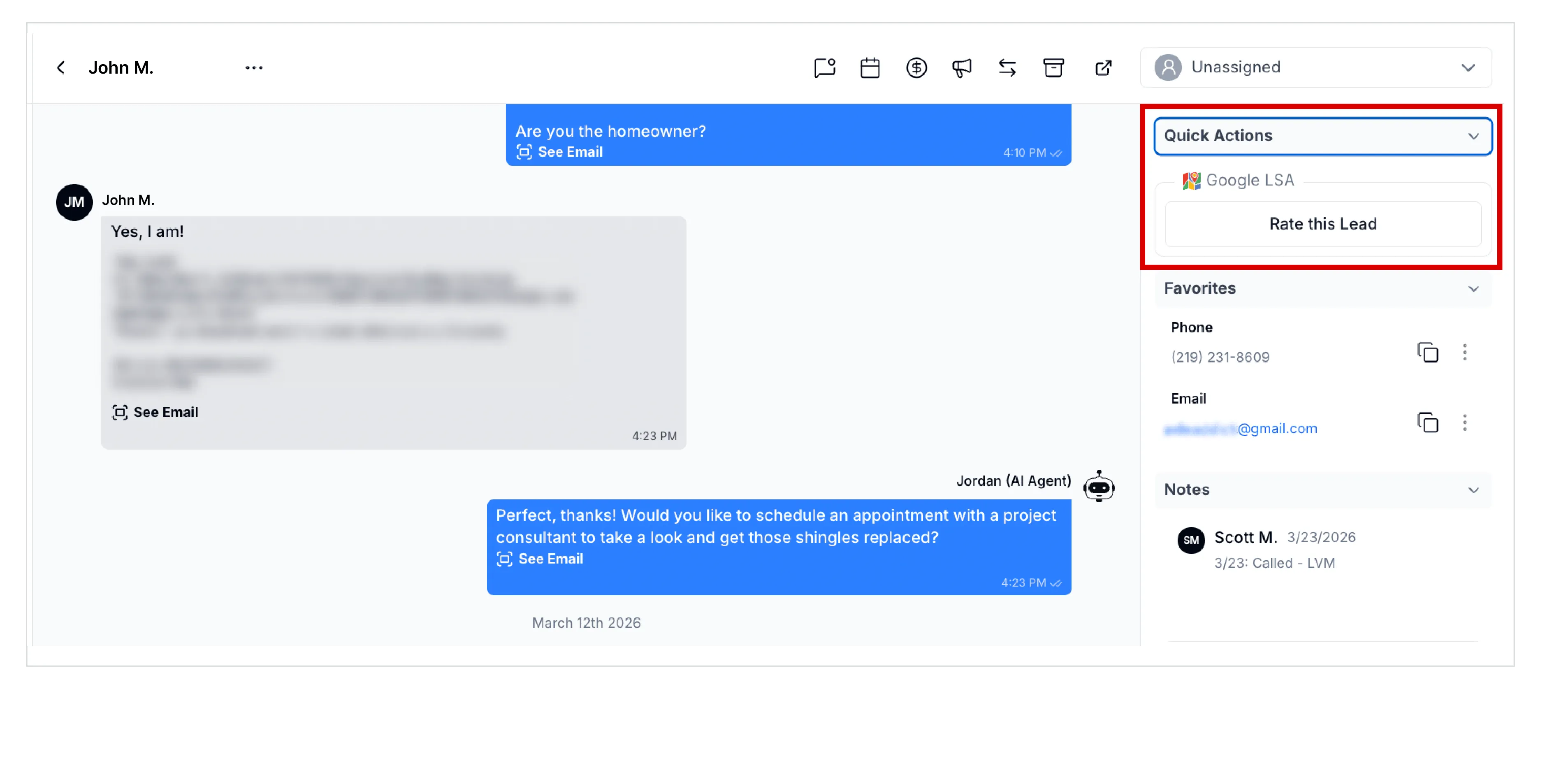
Step 1: Open Quick actions
From any conversation card, go to the right-hand panel and click Quick actions. You'll see a Google LSA option with a Rate this Lead button.
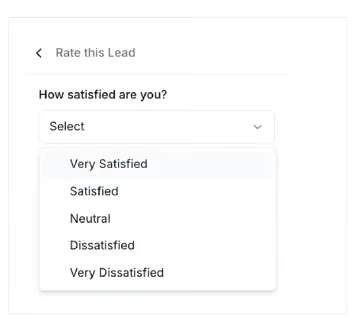
Step 2: Rate your satisfaction
Click Rate this lead and you'll be asked "How satisfied are you?" Choose from seven options:
- Unspecified
- Unknown
- Very satisfied
- Satisfied
- Neutral
- Dissatisfied
- Very dissatisfied
Step 3: Add a reason (optional)
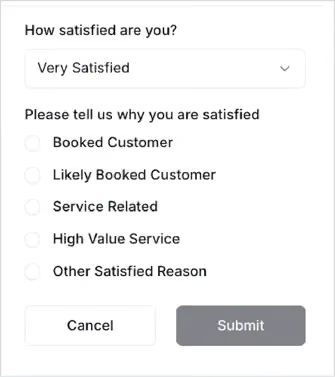
Depending on your rating, you can select a reason why.
If you chose satisfied or very satisfied, your reason options include:
- Unspecified
- Unknown
- Booked customer
- Likely booked customer
- Service related
- High value service
- Other satisfied reason
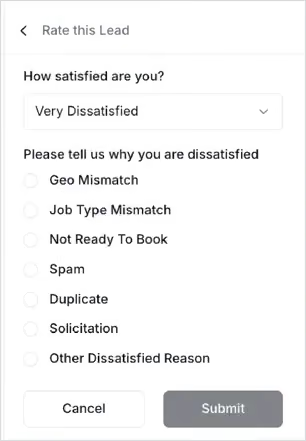
If you chose dissatisfied or very dissatisfied, your reason options include:
- Unspecified
- Unknown
- Geo mismatch
- Job type mismatch
- Not ready to book
- Spam
- Duplicate
- Solicitation
- Other dissatisfied reason
There's also an open text field for other reasons.
Step 4: Submit
Hit submit and you're done. That feedback is sent back to Google, helping refine how their system matches leads to your business over time.
Instead of managing lead intake in one system and lead quality in another, Hatch becomes the single place where:
- Leads are received
- Conversations are handled
- Outcomes are logged
- Feedback is submitted
Why this matters
This feature has a twofold benefit:
- The advantages of lead rating itself. Your ratings train Google's algorithm to send you better-matched leads over time — and flag bad leads so you can get credits back for ones that weren't legitimate. The more consistently you rate, the better your lead quality gets.
- The advantage of doing it in Hatch. Your team is already in Hatch handling conversations, following up, and booking jobs alongside AI agents. Now they can rate leads as part of that same workflow instead of logging into a separate portal to do it later (or not doing it at all). For multi-location teams managing multiple LSA accounts, this is especially valuable — lead rating stays centralized instead of scattered across separate Google logins.
The bigger picture
Google LSA is one of the most valuable lead channels in home services — and it's only getting more important. The integration itself already eliminates having to monitor a separate platform for new leads. Now, lead rating eliminates having to go back to that platform to improve the quality of those leads.
As service businesses scale, fragmentation becomes the real cost. This feature is another step toward eliminating it. The more you can do without leaving Hatch, the more time your team gets back — and the better your results get across every channel.
Because improving lead quality shouldn't require another tool. It should be built into the way you already operate.
Get started
- Hatch customers: If your Google LSA integration is enabled, lead rating is available now. Email [email protected] or reach out to your Account Manager with questions.
- Not using Hatch yet? Book a demo to see how Hatch brings your lead sources, communication, and operations into one place.